


7 Best Laser Cutting Machines for Small Business Buyers
Choosing a laser cutting machine for a small business is less about buying the most powerful model and more about matching the machine to daily work. A maker producing engraved maple signs has different needs from a shop cutting acrylic panels or thin sheet metal. Bed size, material compatibility, cutting speed, software, and maintenance costs all shape the real price of ownership. So does the space around the machine. A desktop unit may fit beside a workbench, while its ventilation system needs room too.
Theodore Maiman, whose pioneering work helped launch modern laser technology, is often credited with saying, “The laser is a solution looking for a problem.” The line is a useful reminder: start with the products you plan to make, not a flashy specification sheet. Some buyers may still choose too quickly. That happens. The seven machines in this guide are compared through practical questions: What materials can they process? How much setup do they demand? Can the business get dependable support and replacement parts? We also consider workflow details, from aligning a small plywood sheet to keeping smoke away from finished goods. No single model fits every shop, and published specifications cannot replace a real sample cut. Use this shortlist as a starting point, then check the manufacturer’s current documentation and test the materials you expect to sell.
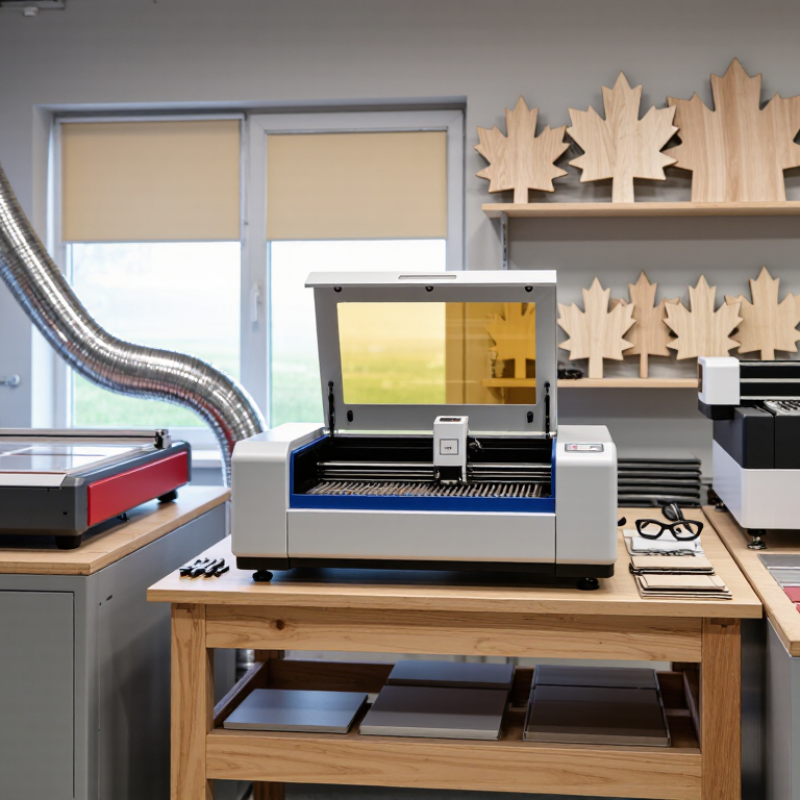
Understanding Laser Cutting Machines for Small Businesses
A laser cutting machine directs a focused beam through a material, following digital files to cut or engrave shapes. For a small shop, the useful question is not simply how fast it cuts. Match the laser type, power, work area, and ventilation to your materials and daily order volume. CO2 systems commonly process wood and acrylic; fiber systems are typically suited to metals. Always verify the machine’s specifications for the exact material and thickness. Details matter.
Grand View Research’s 2024 laser cutting machines market report forecasts industry growth of about 6.5% annually through 2030. That trend suggests growing adoption, but it does not prove a machine will pay for itself in your shop. The U.S. Small Business Administration’s 2024 Small Business Profile reports that small businesses make up 99.9% of U.S. businesses. Lean teams may have limited time for setup, maintenance, and file preparation, so ease of use is a real operating cost.
Before buying, price the full workflow: extraction, suitable electrical service, replacement parts, training, and material waste. OSHA identifies beam exposure and fire as laser hazards; fumes also require careful control. A scrap test can reveal scorch marks, weak edges, or slow cutting before customer material is used. I would not trust a speed claim alone. A tidy sample can hide a long production cycle. Keep records of settings and results, and check whether your workspace can safely handle the machine.
7 Best Laser Cutting Machines for Small Business Buyers – Understanding Laser Cutting Machines for Small Businesses
| Option | Machine Type | Typical Laser Power | Typical Work Area | Common Applications | Key Buying Consideration |
|---|---|---|---|---|---|
| 1 | Compact diode laser cutter | About 5–10 W optical output | Approximately 400 × 400 mm | Small wooden signs, paper, card, and coated materials | A low-space option for light-duty work; generally slower and less capable on thicker stock than higher-powered machines. |
| 2 | Enclosed diode laser cutter | About 20–40 W optical output | Approximately 400 × 400 to 800 × 400 mm | Personalized wood products, craft materials, and batch engraving | Check the stated optical output, enclosure interlocks, exhaust system, and the machine’s tested cutting limits. |
| 3 | Desktop CO₂ laser cutter | About 40–60 W | Approximately 300 × 200 to 600 × 400 mm | Acrylic, wood, paper, leather, and other suitable non-metal materials | Confirm usable bed dimensions, cooling requirements, ventilation, and local service availability. |
| 4 | Mid-size CO₂ laser cutter | About 60–100 W | Approximately 600 × 400 to 900 × 600 mm | Sign making, acrylic parts, packaging prototypes, and repeatable product runs | A useful balance of bed size and throughput; check cutting speed on the materials used in your business. |
| 5 | Large-format CO₂ laser cutter | About 100–150 W | Approximately 900 × 600 to 1300 × 900 mm | Larger signs, furniture components, display pieces, and sheet-material production | Allow for machine footprint, extraction capacity, cooling, electrical requirements, and material handling. |
| 6 | Compact fiber laser sheet-metal cutter | About 1–2 kW | Varies; compact systems may use beds around 600 × 600 mm or larger | Cutting sheet metals such as mild steel, stainless steel, and aluminum within machine specifications | Verify the cutting chart for each metal and thickness, plus guarding, assist gas, extraction, and installation needs. |
| 7 | Production fiber laser sheet-metal cutter | About 3–6 kW | Commonly around 1500 × 3000 mm | Higher-volume metal parts and larger sheet-metal jobs | Best suited to businesses with sufficient production demand, floor space, power, and trained operators. |
Typical ranges are provided for comparison, not as guaranteed specifications. Actual work areas and cutting performance vary by configuration, material, thickness, and operating conditions. Always verify the manufacturer’s specifications and follow laser-safety and ventilation requirements.
Related Posts
-
What Is a Laser Cutting Machine and How Does It Work?
-
How to Choose a Laser Cutting Machine?
-
What is a laser cutting machine and how does it work?
-
7 Best Laser Cutting Sheet Metal Suppliers for Global Buyers
-
2026 Top Laser Cutting Machines for Global Buyers
-
Why Choose Laser Cutting for Your Business?